Abstract Factory pattern aslında factory'lerin factory'sidir. Hatırlayalım, Factory pattern'da bir factory shape'leri üretiyordu. Abstract Factory pattern'da ise shape'leri, color'ları üreten factory'leri üreten bir factory vardır.
- Aşağıda Shape ve Color diye 2 tane interface tanımlayacağız.
- Sonra bu interface'leri implement eden concrete class'lar tanımlayacağız (Circle, Rectangle, Square, - Red, Blue, Green class'larını tanımlayacağız).
- Sonra AbstractFactory isimli bir abstract class tanımlayacağız.
- Sonra AbstractFactory isimli abstract class'ı implement eden ShapeFactory ve ColorFactory isimli concrete class'ları tanımlayacağız. Bu class'lar, yukarıdaki Circle, Rectangle, Square, - Red, Blue, Green concrete class'larından birini return eder.
- FactoryProducer class'ını tanımlarız. Bu class, uygun factory class'ını return eder : ShapeFactory veya ColorFactory.
- AbstractFactoryPatternDemo class'ını implement ederiz. Bu class'da FactoryProducer class'ının static method'u olan getFactory() method'unu çağırarak bir factory elde ederiz. Sonra bu factory'nin getShape() method'Unu çağırarak bir shape object elde ederiz:
      //get shape factory
      AbstractFactory shapeFactory = FactoryProducer.getFactory("SHAPE");

      //get an object of Shape Circle
      Shape shape1 = shapeFactory.getShape("CIRCLE");

      //call draw method of Shape Circle
      shape1.draw();
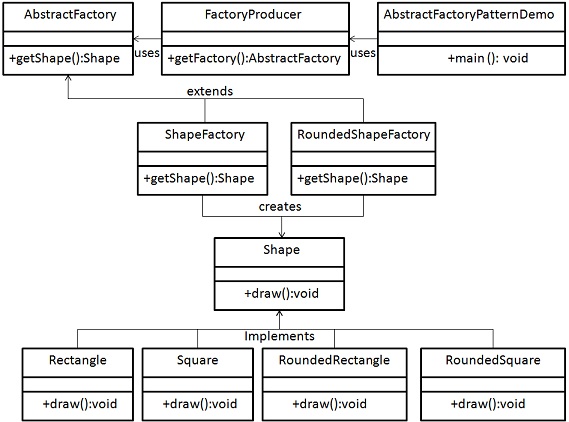
Aşağıdaki uml'de görülen kodu yazacağız birazdan. Bu kodda abstract factory pattern design'ı kullanılmıştır.
Step 1
Create an interface for Shapes.
Shape.java
public interface Shape {
   void draw();
}
Step 2
Create concrete classes implementing the same interface.
Rectangle.java
public class Rectangle implements Shape {

   @Override
   public void draw() {
      System.out.println("Inside Rectangle::draw() method.");
   }
}
Square.java
public class Square implements Shape {

   @Override
   public void draw() {
      System.out.println("Inside Square::draw() method.");
   }
}
Circle.java
public class Circle implements Shape {

   @Override
   public void draw() {
      System.out.println("Inside Circle::draw() method.");
   }
}
Step 3
Create an interface for Colors.
Color.java
public interface Color {
   void fill();
}
Step4
Create concrete classes implementing the same interface.
Red.java
public class Red implements Color {

   @Override
   public void fill() {
      System.out.println("Inside Red::fill() method.");
   }
}
Green.java
public class Green implements Color {

   @Override
   public void fill() {
      System.out.println("Inside Green::fill() method.");
   }
}
Blue.java
public class Blue implements Color {

   @Override
   public void fill() {
      System.out.println("Inside Blue::fill() method.");
   }
}
Step 5
Create an Abstract class to get factories for Color and Shape Objects.
AbstractFactory.java
public abstract class AbstractFactory {
   abstract Color getColor(String color);
   abstract Shape getShape(String shape) ;
}
Step 6
Create Factory classes extending AbstractFactory to generate object of concrete class based on given information.
ShapeFactory.java
public class ShapeFactory extends AbstractFactory {

   @Override
   public Shape getShape(String shapeType){

      if(shapeType == null){
         return null;
      }

      if(shapeType.equalsIgnoreCase("CIRCLE")){
         return new Circle();

      }else if(shapeType.equalsIgnoreCase("RECTANGLE")){
         return new Rectangle();

      }else if(shapeType.equalsIgnoreCase("SQUARE")){
         return new Square();
      }

      return null;
   }

   @Override
   Color getColor(String color) {
      return null;
   }
}
ColorFactory.java
public class ColorFactory extends AbstractFactory {

   @Override
   public Shape getShape(String shapeType){
      return null;
   }

   @Override
   Color getColor(String color) {

      if(color == null){
         return null;
      }

      if(color.equalsIgnoreCase("RED")){
         return new Red();

      }else if(color.equalsIgnoreCase("GREEN")){
         return new Green();

      }else if(color.equalsIgnoreCase("BLUE")){
         return new Blue();
      }

      return null;
   }
}
Step 7
Create a Factory generator/producer class to get factories by passing an information such as Shape or Color
FactoryProducer.java
public class FactoryProducer {
   public static AbstractFactory getFactory(String choice){

      if(choice.equalsIgnoreCase("SHAPE")){
         return new ShapeFactory();

      }else if(choice.equalsIgnoreCase("COLOR")){
         return new ColorFactory();
      }

      return null;
   }
}
Step 8
Use the FactoryProducer to get AbstractFactory in order to get factories of concrete classes by passing an information such as type.
AbstractFactoryPatternDemo.java
public class AbstractFactoryPatternDemo {
   public static void main(String[] args) {

      //get shape factory
      AbstractFactory shapeFactory = FactoryProducer.getFactory("SHAPE");

      //get an object of Shape Circle
      Shape shape1 = shapeFactory.getShape("CIRCLE");

      //call draw method of Shape Circle
      shape1.draw();

      //get an object of Shape Rectangle
      Shape shape2 = shapeFactory.getShape("RECTANGLE");

      //call draw method of Shape Rectangle
      shape2.draw();

      //get an object of Shape Square
      Shape shape3 = shapeFactory.getShape("SQUARE");

      //call draw method of Shape Square
      shape3.draw();

      //get color factory
      AbstractFactory colorFactory = FactoryProducer.getFactory("COLOR");

      //get an object of Color Red
      Color color1 = colorFactory.getColor("RED");

      //call fill method of Red
      color1.fill();

      //get an object of Color Green
      Color color2 = colorFactory.getColor("Green");

      //call fill method of Green
      color2.fill();

      //get an object of Color Blue
      Color color3 = colorFactory.getColor("BLUE");

      //call fill method of Color Blue
      color3.fill();
   }
}
Step 9
Verify the output.
Inside Circle::draw() method.
Inside Rectangle::draw() method.
Inside Square::draw() method.
Inside Red::fill() method.
Inside Green::fill() method.
Inside Blue::fill() method.

Hiç yorum yok:
Yorum Gönder